
Find your AI coding sessions
One local app for every session Claude Code, Codex, opencode, Gemini, Cursor and five more have written. Resume the one you forgot, or hand it to a different assistant with its context.
Version 0.33.1, MIT licensed, with a 14-day Pro trial and no card. Reading, search and cost estimates run locally; cloud features are opt-in. macOS 12+ on Apple silicon; Windows 10/11 x64 in beta (unsigned, so choose “More info”, then “Run anyway” on first launch).
Reads from
 Claude Code
 Codex
Codex opencode
 Gemini
 Cursor
 Kiro
Kiro Cline
Cline Pi
Pi Aider
Aider Qwen
Qwen
Pushes to
 Linear
 Obsidian
 Notion
- Readwise
 Ollama
All your sessions, one place
relai reads the session files Claude Code, Codex and the rest already keep on your disk. Nothing to install in your agents, nothing to proxy.
Pick up where you left off
Jump back into a session you forgot weeks ago, or fork it to a different assistant. relai writes a context primer from the transcript, CLAUDE.md and memory, then opens the target CLI for you.
See which agents are working
See who is writing right now, and which terminals are still open but waiting on you. relai checks the actual CLI processes, so a closed terminal drops off at once. The menu-bar tray keeps active agents and this month's spend one click away.
Run many agents like a kanban
Flip the session list into a Status board (Working, Needs input, Idle, Done) or a Clusters board where you drag sessions into named groups, set rules by project or tag, and let Jev sort whatever is left.
Know what each tool costs
Token counts come straight from the session files; cost is estimated from them per tool and model. Leave side projects out of your reports with one checkbox.
Find any forgotten session
Search titles, previews and project paths. Custom titles mean you see fix-auth-bug, not a UUID.
Send sessions anywhere
Export CSV or JSON, push notes and reports to Obsidian, Notion or Readwise, and file scan findings as Linear issues that close themselves when you mark the fix resolved.
See how you actually work
Median session length, prompts per session, tool calls per prompt, your busiest hours and weekdays, with the change against the previous period.
Summaries at $0 with Ollama
Flip one switch and summaries, handoff primers and study reports run on your local Ollama model. If it stumbles, your cloud CLI picks up.
Guides for the handoff
Find the conversation you need, or carry its context into the next tool. Each guide walks through it step by step.
Manage your Claude Code sessions
Search across projects, read the transcript and reopen the right session. See where the built-in CLI is enough and where a visual library helps.
Move from Claude Code to Codex
Continue with a context primer instead of rebuilding the conversation. Learn what carries over, what stays local and what to check before continuing.
How Relai works with coding agents
See how local session history becomes a searchable workspace, and how you choose to resume, hand off or scan work.
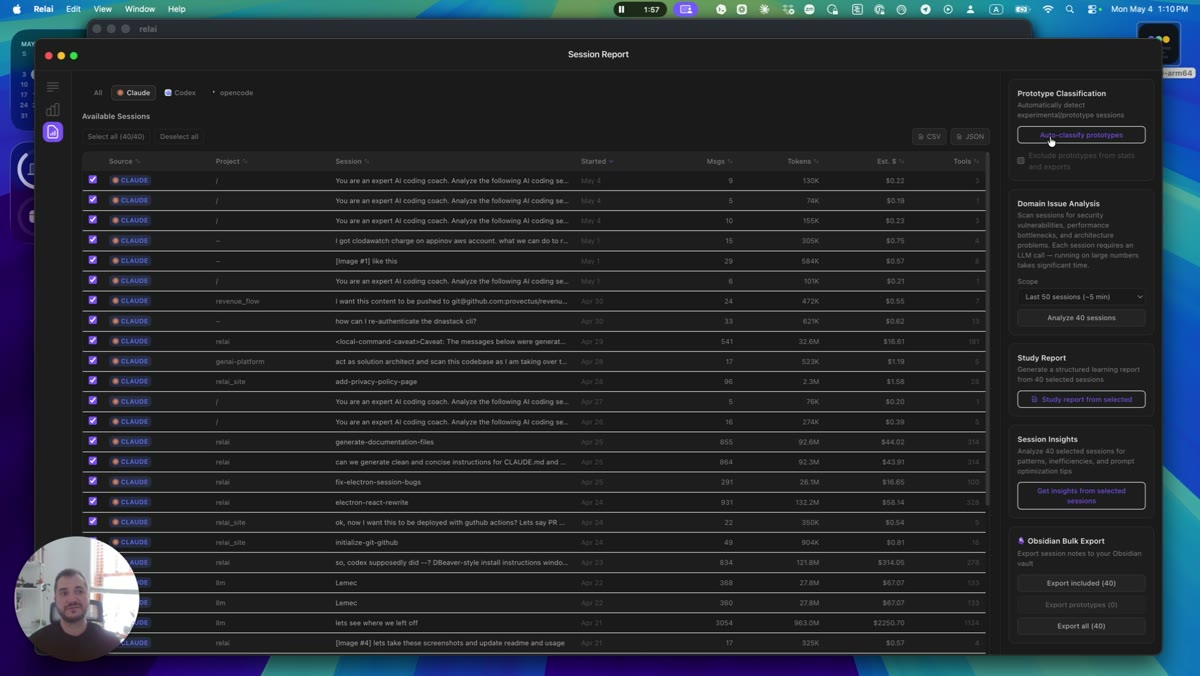
Sessions in, signal out
relai parses the session files your AI coding CLIs write and lays them out as one dashboard. You browse history locally and choose when to use cloud features.
Learn from your sessions
Once every session is in one place, relai can read them back to you: what went wrong, and what was worth learning.
Scan for issues
Surface security, performance and architecture issues hiding in your sessions, on a schedule, with alerts and one-click fixes.
Learning reports
Distill a session into the concepts behind it and a two-to-four-week study plan, sent straight to Obsidian.
Sync sessions, in beta
Capture on one machine, pick up on another. Sessions from every tool sync across your devices, encrypted before upload, with keys supplied by the sync service.
Start free, then pick a plan
Start with a 14-day Pro trial — no credit card required.
Free trial
The full app, nothing held back
- Everything in Pro, unrestricted
- All 10 tools from the first launch
- No credit card required
- Keeps free access to Consumption after the trial
Pro
after the free trial
The pick if you live in Claude Code all day.
- Unified session view of 10 tools: Claude Code, Codex, opencode, Gemini CLI, Cursor, Kiro, Cline, Pi, Aider, Qwen
- Token usage, cost & efficiency trends
- Cross-tool session handoff & resume
- Live agent monitor for active and idle terminals
- Cross-session full-text search
- Obsidian / Notion / Readwise export
- Study reports & session insights
- Encrypted cross-machine sync
- All future updates
Team
For teams working with AI. Pick seats at checkout.
- Everything in Pro, for every member
- Team dashboard with aggregated usage and cost
- See who's working on what, with opt-in shared sessions and tags
- Invite-based seats; members join free
- Team sharing: usage totals and optional session metadata
Need a business license, with volume seats, invoicing, or a custom agreement? Contact us
Questions, answered
Which AI coding tools does relai work with?
relai reads existing local session files from ten tools: Claude Code, Codex, opencode, Gemini CLI, Cursor, Kiro, Cline, Pi, Aider, Qwen. No plugin is installed into those tools. Detection depends on the files available on your machine; some sources, such as Aider, need a custom path in Preferences.
Does relai send my code or sessions to the cloud?
Reading, caching, search and cost estimates run locally. AI summaries, scans and handoffs can send session excerpts to configured cloud providers, including Jev when enabled. Ollama can run locally, but provider fallback can still use cloud tools. Optional sync uploads encrypted session files, team features share usage totals and optionally session metadata, and integrations send the content you export. Sign-in, licensing and product analytics also use network services; analytics can be disabled in Preferences.
How do I resume or move an old Claude Code session?
Find the session, then choose Resume when its installed CLI supports that session format. Hand off creates a context primer for one of nine target CLIs: Claude Code, Codex, opencode, Gemini, Cursor, Kiro, Pi, Aider or Qwen. Cline can be read as a source but is not a handoff target. The primer carries selected conversation context and available project instructions; coverage depends on the source format.
How does the issue scan decide what to flag?
Scans run Jev first — TypeSafe's small decision model — which answers typed questions about each slice of the transcript and points at the exact message as evidence. When Jev is disabled, unavailable or uncertain, the configured LLM can analyze the session instead. Jev requests mask recognized credential patterns, but this is not a guarantee that every secret is removed. Jev is disabled by default and requires enabling it plus a TypeSafe token (saved in Settings or supplied through the environment).
Can I group sessions into boards?
Yes. The Sessions tab has a Status board (Working, Needs input, Idle, Done, driven by which agent processes are actually running) and a Clusters board where you drag sessions into named clusters, set rules by project or tag, or let Jev sort the unsorted ones.
How does relai track token usage and cost?
relai parses real session data to build per-tool token and cost breakdowns, daily usage trends, and a monthly spend total that's one click away in the menu bar. Side projects can be excluded from reports with a single checkbox.
How much does relai cost?
14-day free trial, no credit card required. Pro is $9.99 CAD/month or $99 CAD/year; Team is $19.99 CAD/seat/month. Consumption remains free after the trial.
Does relai work on Windows or Linux?
relai supports macOS on Apple Silicon and Windows 10/11 x64 (beta). On macOS, download the DMG and drag Relai.app into Applications. On Windows, use the installer from the public releases page. Linux is not currently shipped. Available actions depend on your installed CLIs and session formats.

Made by Oleksandr Kazakov
Solo developer who spends all day in AI coding CLIs, and got tired of losing sessions, context and spend across ten different tools. relai is the dashboard I built for myself, now shared with everyone.