
What a handoff carries
A cross-tool handoff gives the receiving assistant a description of prior work. It does not transfer Claude Code’s internal conversation state into Codex. The original session stays available; the Codex conversation is new.
relai can assemble a primer from selected source text or use the configured summarizer to distill the conversation. It includes recent messages, available project memory files and a reference to a recoverable local source archive. Older tool output can be shortened or referenced instead of copied inline.
This is useful for asking a different assistant to review an approach, continue implementation or investigate an unresolved failure. The repository is still the source of truth for what has actually changed.
Before you switch tools
- Install and authenticate Codex. Run it in your normal terminal first and confirm it works in the project. relai uses the installed target CLI and your existing provider access.
- Have the project available. A transcript is not a copy of the checkout. Ensure the working directory exists and that Codex can read the relevant files.
- Review your AI settings. Context selection and summarization may use configured providers. Check what is enabled and what content may leave your machine in relai’s privacy policy.
- Choose a clear next task. “Reproduce this failing test before editing” gives the new assistant a more useful starting point than “keep going.”
Claude Code → Codex, step by step
- Find and open the Claude Code session. In Sessions, filter to Claude Code and search for the project or a distinctive phrase. The session manager guide explains the transcript-search option.
- Check the latest exchange. Confirm the session contains the goal, constraints and unresolved work you want Codex to receive. Inspect the project path too.
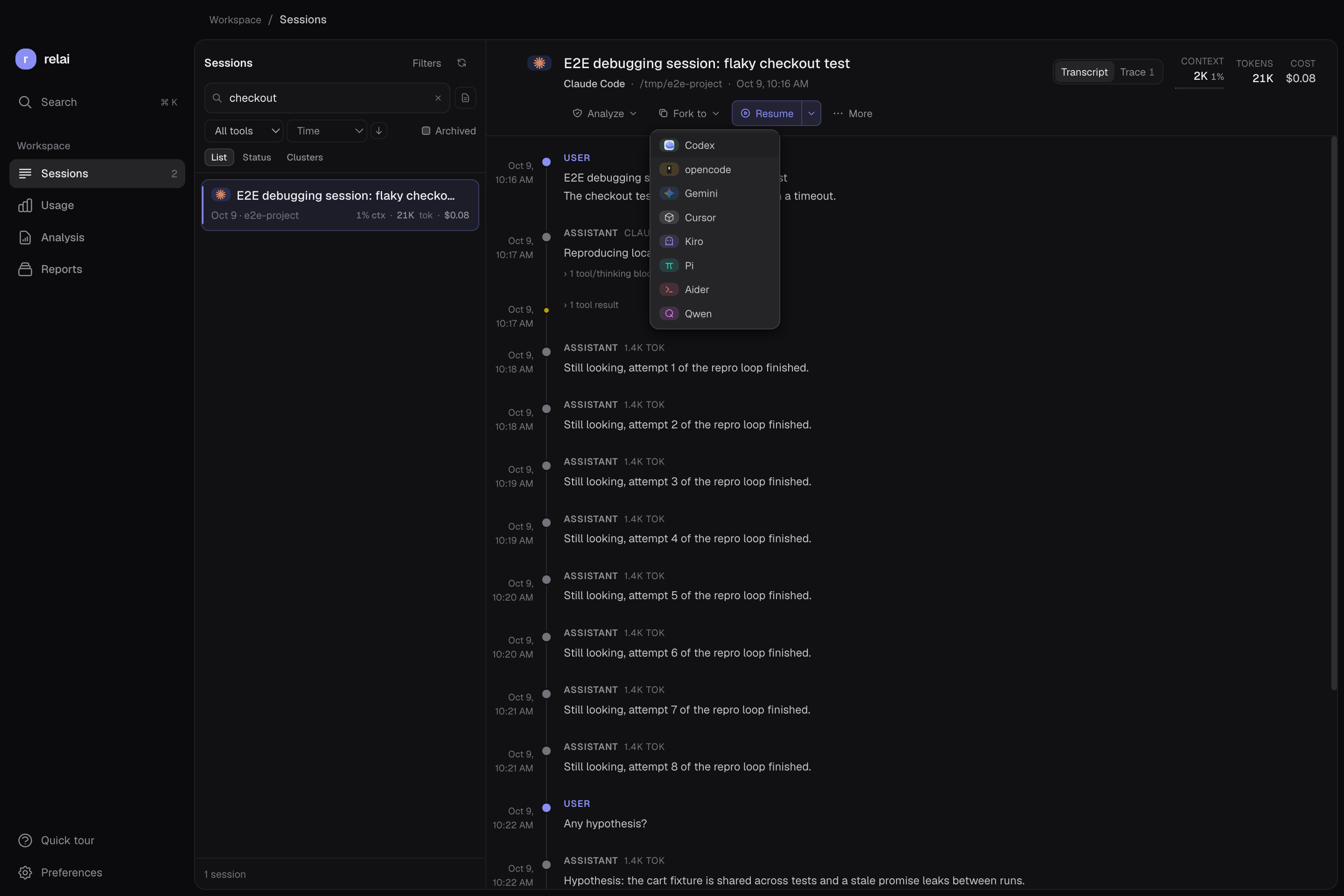
- Choose Fork to → Codex. The Fork to menu is in the transcript toolbar. relai prepares the handoff primer and launches the target according to your terminal and launch settings. Large conversations can take longer to prepare.
- Wait for the new session to open. The target receives an instruction to read the primer and wait for your next instruction. If the app reports a missing CLI or failed launch, verify Codex installation and your launch settings before retrying.
- Give Codex a focused next instruction. Ask it to check the current files, restate the constraints and then take the next concrete step. Keep the original Claude Code transcript available for comparison.
To reopen the original Claude Code conversation instead, use Resume. To open a new Claude conversation with prior context, use Start fresh with context in the Resume menu. These are separate choices from a Codex handoff.
Check the context before acting
A summary can sound complete while missing an important constraint. Ask Codex to confirm the task, identify the files it will inspect and distinguish completed work from proposed work. If an important fact is absent, add it explicitly or consult the original transcript.
For example, after a debugging handoff you might write:
Read the handoff primer, then inspect the current diff. Restate the constraint that the public API must stay unchanged. Reproduce the failing test before proposing an edit.
Neither the handoff nor a native resume restores old files, an earlier shell process or a previous permission grant. Validate the current checkout and use the target tool’s normal review and approval controls.
A manual alternative
You can also write a short Markdown note yourself and ask Codex to read it. Include the goal, relevant files, decisions and constraints, what you verified, what remains uncertain, and the next command or question. Add only the excerpts needed to support those points.
This avoids an automated handoff step and gives you direct control over the context. It still requires reviewing the note and the target assistant’s interpretation. relai is useful when you want to find the original conversation and assemble that starting context from its history.
See the general relai demo for the broader app interface, or compare plans before downloading.
Frequently asked questions
Can Codex resume a Claude Code session ID?
No. Claude Code and Codex use different session formats. relai’s Fork to → Codex action starts a new Codex conversation with a context primer; it does not turn the Claude session into a native Codex session.
Do I need Codex installed and signed in?
Yes. relai launches the target CLI; it does not install Codex or supply authentication, a subscription or API credits. Install and authenticate Codex, and confirm it can run in your project before starting a handoff.
Is the handoff lossless?
No. The primer can contain selected source excerpts or an AI summary, project memory files, recent messages and references to a local source archive. Context can be omitted or shortened, and a summary can miss details. Review the current files and important constraints with Codex before continuing.
Does a handoff upload my conversation?
The primer and recoverable source archive are stored locally. Depending on enabled settings, selected transcript content may be sent to TypeSafe for context selection or to your configured summarizer. The target coding assistant also follows its own provider and data policies. Check your settings and the privacy policy.
Keep your next session within reach.
Use relai to browse your coding history and choose where to continue.
macOS 12+ on Apple Silicon. Windows 10/11 x64 is an unsigned beta. Your coding tools and provider accounts are separate.